
Account and connection
Sign-in, passkeys, email, passwords, BBLX device codes, and app tokens.
Sign-in and recovery
On the sign-in page, choose a passkey or email and password. If the account was created only with a passkey, link and verify an email in the dashboard in advance. Linking requires a fresh passkey check. Without a previously verified email, this account cannot be recovered by email. If no password has been set yet, use access recovery after linking your email.
Connect through a browser
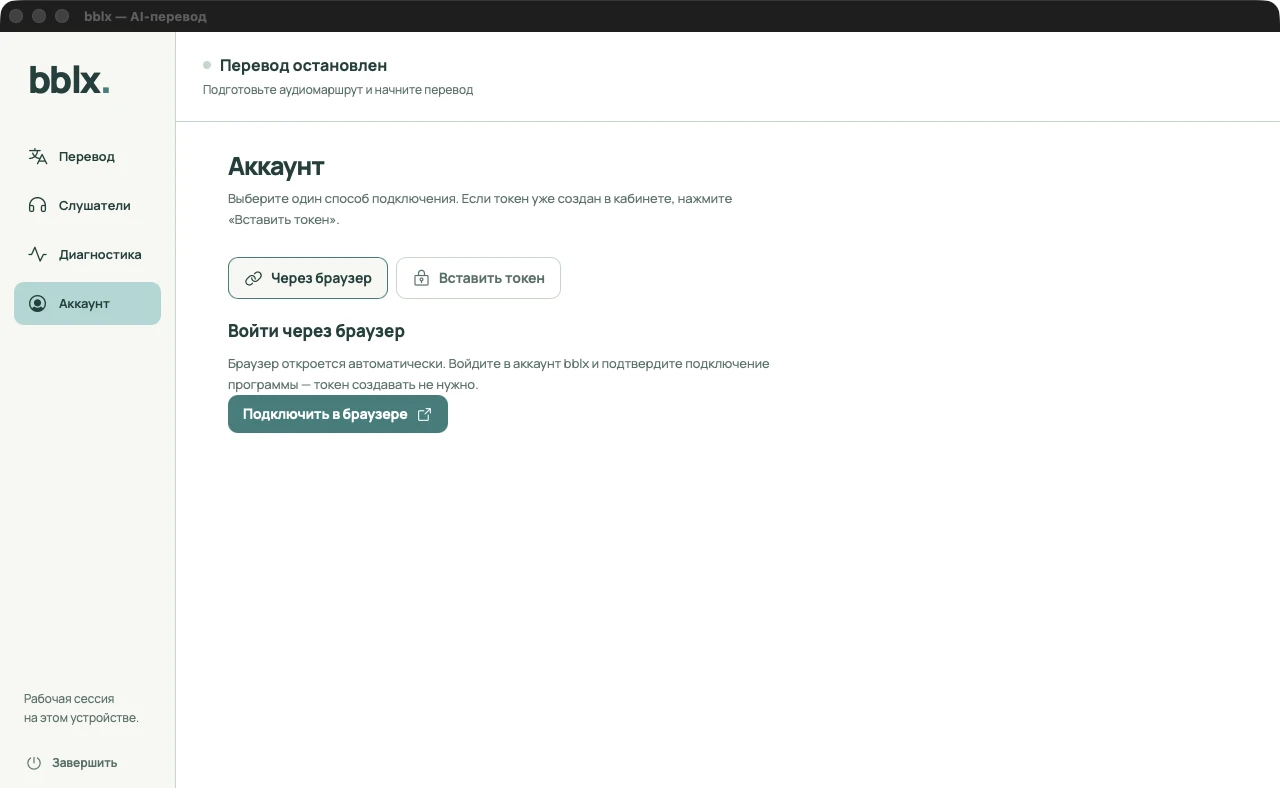
In bblx, click «Аккаунт» → «Подключить в браузере». The «Connect app» page opens with a code. If you open it manually, copy the short code from the app, click «Check code», and confirm only your own request. The code is valid for 10 minutes. When it expires, click «Получить новый код» in the app.
Connect manually with a token
On the «Connect app» page in the dashboard, expand the additional token-connection section. Create a token with a clear name, such as «Venue laptop», and save it immediately: the secret is shown only once. In the app, choose «Вставить токен», paste the complete value, and click «Подключить токен».
The short code BBLX-… confirms a device request; the secret bblx_… gives the app access to the account. Do not publish tokens or active connection codes. If one leaks, revoke it in the dashboard and connect the app again. On a shared computer, after stopping translation choose «Отключить аккаунт» and sign out of the dashboard in the browser.
Screenshots show the Russian-language app interface